Get close, then closer
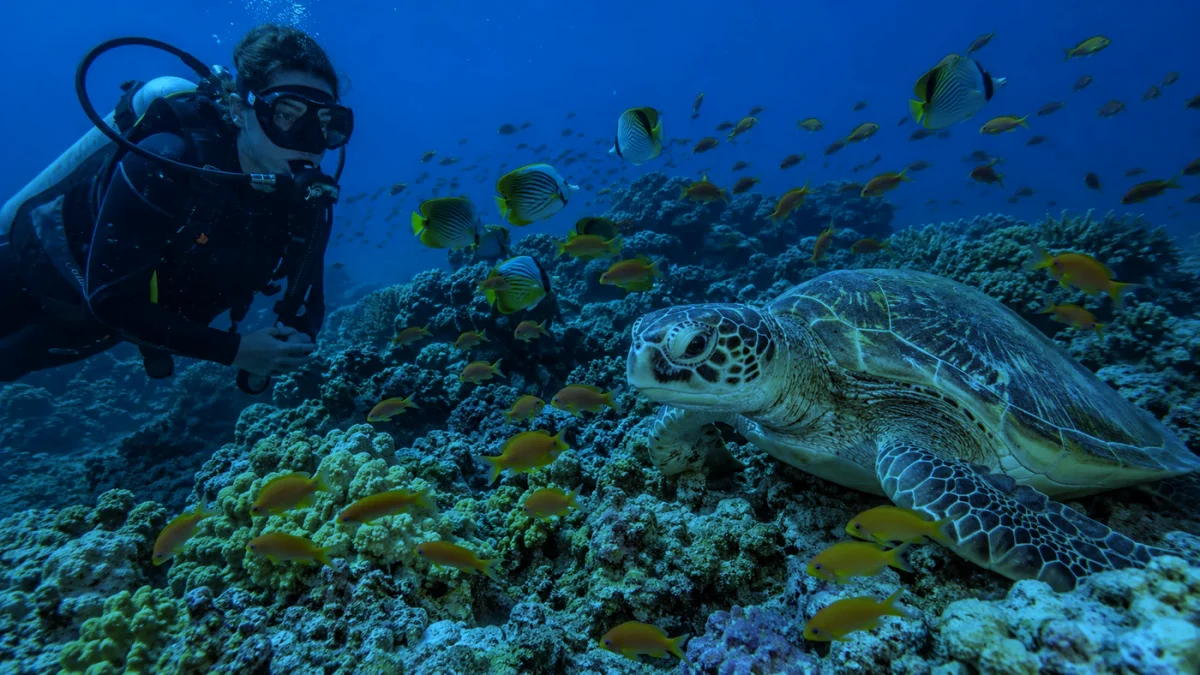
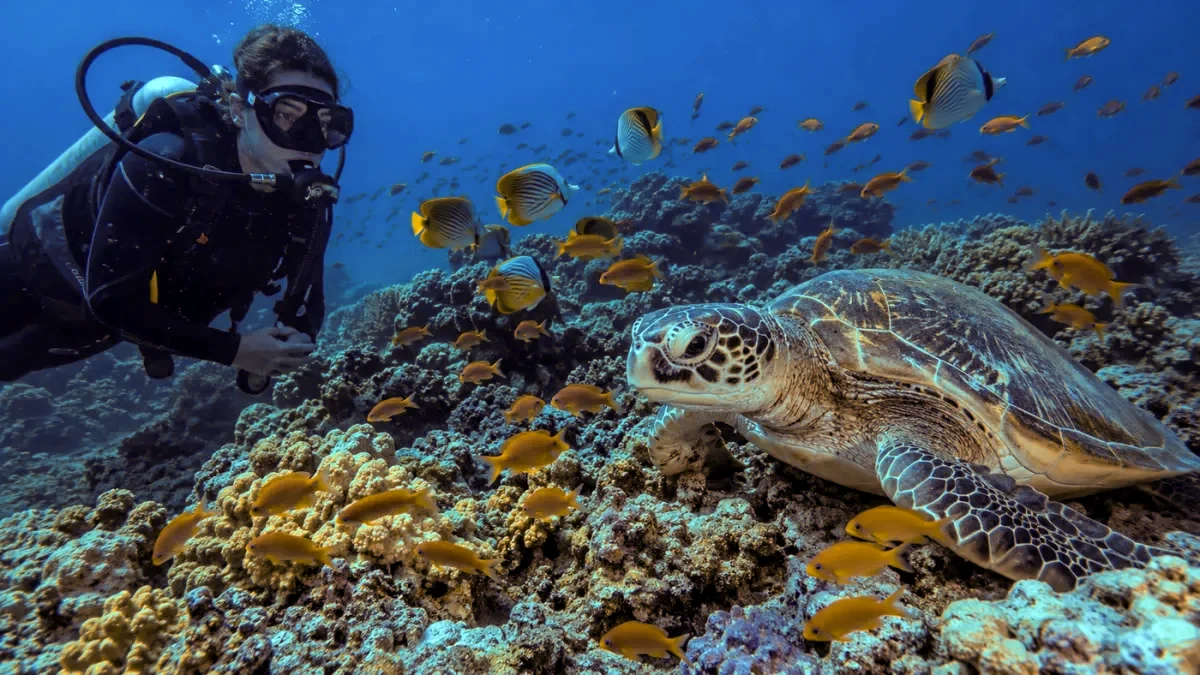
Light loses color over every metre it travels, down AND sideways to your subject. Shooting a turtle from 4 metres away costs you more color than being 15 metres deep. Fill the frame.

Underwater photography guide
You saw a red anemonefish. Your camera saw a grey one. Here is the physics behind it, and how color correction reverses it in seconds.
Quick answer
Water absorbs red light within the first 5 metres, so cameras record blue-green scenes. Color correction software measures how starved the red channel is and rebuilds it from the remaining data. Our free Photo Fix tool does this automatically in your browser: drop a photo in, get the real colors back, download full resolution with no watermark.
Sunlight looks white, but it is a mix of colors, each with its own wavelength. Water molecules absorb long wavelengths much faster than short ones. Red has the longest wavelength of the visible colors, so it is the first casualty. By 5 metres of depth, most red light is simply gone. Orange follows at around 10 metres, yellow at 20.
Blue and green have short wavelengths, so they travel much deeper. That is why the ocean looks blue, why a wreck at 30 metres looks monochrome, and why every unedited diving photo comes home with the same blue-green cast. Your eyes partly compensate while you dive, because your brain remembers what a clownfish or a coral should look like. Your camera has no such memory. It records the light that actually arrives.
One detail most divers miss: the loss counts every metre the light travels, not just straight down. Sunlight drops to your depth, then bounces off your subject and travels sideways to your lens. A shark photographed from 5 metres away loses about as much color again as the depth already took. This is why "get close" is the oldest rule in underwater photography.
What survives at depth (clear ocean water)
Auto white balance was designed for problems on land: warm bulbs, cool shade, cloudy skies. Those shift colors by a little. Water does not shift red, it removes it. At 20 metres there are almost no red photons left for the camera to amplify, so auto white balance gives up and delivers the blue scene as it is.
The built-in flash does not save you either. It carries full-spectrum light, but only for about a metre and a half. Beyond that it mostly lights up the particles floating between you and the subject, which is the backscatter snow you see in many flash shots.
So the honest situation is this: unless you shoot with big strobes at close range, the color data in your file is bent. The good news is that it is bent in a predictable, physics-driven way. And anything predictable can be reversed in software.
A proper underwater correction is smarter than dragging a warmth slider. This is what happens under the hood, and it is what our free Photo Fix tool does with every photo:
The tool samples the whole image and reads the average of each color channel. A photo taken at 15 metres might carry only a fifth of the red energy it should. That gap tells the algorithm how deep and how far the light travelled.
You cannot just multiply the weak red signal, that only amplifies noise. Instead the algorithm mixes information from the healthy green and blue channels back into red through a color matrix, the same math behind paid apps like Dive+.
Underwater light is flat, so the tool stretches each channel histogram until the darkest pixels are truly dark and the brightest are bright. Contrast and punch come back without any fake sharpening.
A naive correction turns open blue water pink or magenta. The algorithm detects water areas and holds their hue, so the fish gets its red back while the blue behind it stays honest.
All of it runs in your browser, on your device. Nothing is uploaded, which is also why it works fine on boat Wi-Fi.
5 photos free, no account. A free account makes it unlimited.
Editing rescues photos. These habits mean there is less to rescue. They are the same tips our guides share on the boat between dives.
Light loses color over every metre it travels, down AND sideways to your subject. Shooting a turtle from 4 metres away costs you more color than being 15 metres deep. Fill the frame.
The top 10 metres hold most of the warm light. Reef tops, snorkeling shots and safety stops are where photos still look colorful straight out of camera.
A red filter blocks part of the blue light so the channels balance out again. It works in blue water at mid depths, but it steals light, so skip it on dark days and below 25 metres.
A video light or strobe carries the full spectrum with you. It only reaches 1 to 2 metres, so it is for close-ups: fish portraits, corals, macro. It cannot light a wreck.
RAW files keep all the color data, so corrections stay clean. No RAW? Set manual white balance on a white slate every few metres of depth change. And fix the rest in post.
The best camera training is bottom time. Join a daily diving trip in Hurghada and our guides will help you with camera settings on board.
Good to know
What divers ask us about blue photos and how to fix them
The fastest way is an automatic color correction tool. Our free Photo Fix tool at divetoday-hurghada.com/photo-fix runs in your browser: drop the photo in, it measures how much red the water removed and puts it back, then you fine-tune with sliders and download in full resolution. No app install, no upload, no watermark.
Water absorbs light colors one by one. Red is gone by about 5 metres, orange by 10, yellow by around 20. Your camera records what is left, which is mostly blue in clear ocean water and green where there is more algae or sediment. It is pure physics, not a camera fault.
Rough rule in clear water: red fades by 5 metres, orange by 10, yellow by 20, and below 30 metres you are left with blues and greens. Distance to your subject counts too, because the light also travels sideways from the subject to your lens.
Yes, within limits. A red filter rebalances the light between roughly 5 and 25 metres in blue water, which is why GoPro divers love them. But filters cost you light and stop working deeper, so most divers combine a filter with software color correction afterwards.
Yes. The physics is the same for every camera, so the fix is the same. Our free tool works with JPG and PNG photos from GoPros, phones, compacts and drones, right in the browser on your phone. iPhone HEIC photos just need to be saved as JPG first.
Do both. Get close, stay shallow when you can, and use light or a filter. But even pros come home with blue shots from deep or wide scenes, and software fixes those in seconds. That is why we built a free correction tool for our divers.
The water is 28°C, the visibility is over 30 m, and a boat with your name on it leaves tomorrow at 8 AM.